
Notifications
Notifications tell you when something in the platform needs attention. Rather than a single
"email me on errors" switch, you build rules: each one subscribes to a specific condition,
scoped to specific things, at a priority you choose, delivered to the people you name.
Two kinds of rule
| Organization rules | My rules | |
|---|---|---|
| Configured at | Organization → Notifications | Account → My Notifications |
| Owned by | The organization | You |
| Applies to | Everyone named as a recipient | You |
| Who can edit | Users with the Notifications Edit permission | You |
Both are evaluated together. If an org rule and one of your own rules both match an event,
you get one notification carrying the highest priority of the two — not two emails.
What you can be notified about
Integrations
| Trigger | Fires when |
|---|---|
| Integration failed | An execution ends in a failed state |
| Integration succeeded | An execution completes successfully |
| Integration not run | A scheduled integration hasn't executed within a time window you set |
Integration not run is the one that catches silent failures — a feed that stopped being
triggered at all produces no failure to alert on.
Agent Jobs
| Trigger | Fires when |
|---|---|
| Agent job failed | An execution ends in a failed state |
| Agent job succeeded | An execution completes successfully |
| Agent job returned no data | The job succeeded but produced no data files |
Interface Server
| Trigger | Fires when |
|---|---|
| Interface started | An interface comes up |
| Interface stopped (error) | An interface stopped because of an error, crash or retry exhaustion |
| Interface stopped (any) | An interface stopped for any reason, including a user stopping it |
| Message failures | A threshold of failed message iterations is crossed within a time window |
| Messages not received | Fewer than a minimum number of messages arrive within a time window |
Scripts
| Trigger | Fires when |
|---|---|
| Script execution failed | An organization script execution ends in a failed state |
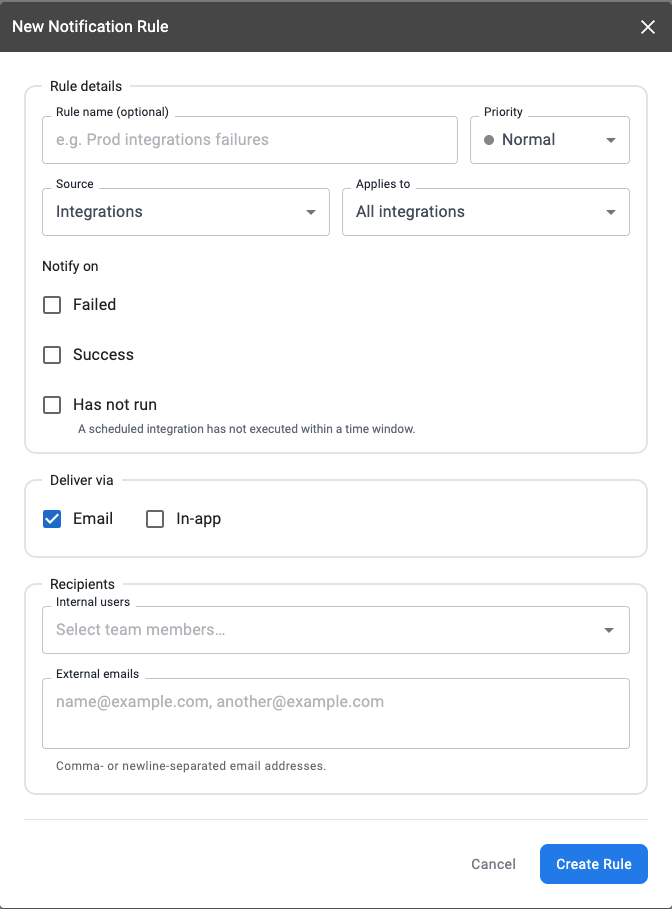
Building a rule
- Choose a source — Integration, Agent Job, Interface Server, or Script Execution.
- Choose a trigger from that source's list. Some triggers take parameters, such as a
time window and a threshold. - Set the scope — All (every integration / agent job / interface) or Specific
(an explicit list you pick). - Set a priority — Normal, High, or Critical. Priority drives how the notification is
labeled and styled, how it sorts, and how it's grouped for digests and throttling. - Add recipients — either platform users (their contact details are resolved when
the notification is sent) or free-form email addresses for people outside the platform. - Choose channels — in-app and email; SMS is gated on per-user consent
Delivery history
Each notification records, per recipient and per channel, whether it was sent, skipped
(intentionally not delivered — for example, no address could be resolved) or failed (the
channel attempt errored). Check here first when someone reports not receiving an alert.
Updated 2 months ago