
Interfaces
An interface is a standing message route. Find them under Interface Server → Interfaces.
The list
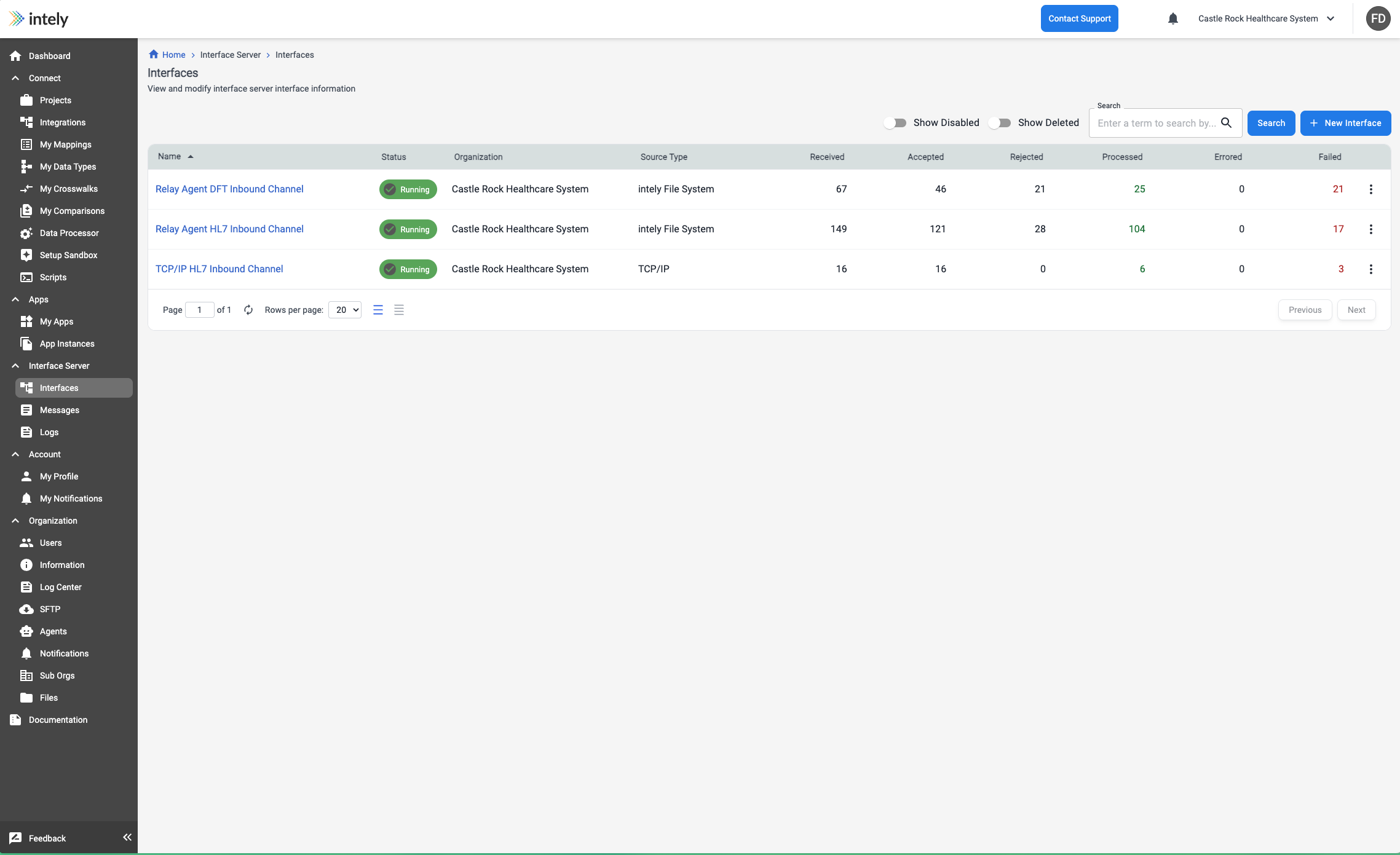
Each row is one route, with its running totals:
| Column | Meaning |
|---|---|
| Status | Whether the route is currently running |
| Source Type | Where messages arrive from |
| Received | Messages that arrived |
| Accepted | Messages that parsed and validated successfully |
| Rejected | Messages that could not be accepted — malformed, or failed validation |
| Processed | Messages where every destination completed |
| Errored / Failed | Messages where delivery did not complete |
Accepted and Processed are different questions. Accepted means the message was understood;
Processed means it reached every destination. A route can accept everything and still fail to
deliver.
The Received and Failed figures are links — selecting one opens Messages filtered to
exactly those messages, which is the quickest route from "something is wrong" to the specific
messages involved.
Toggle Show Disabled and Show Deleted to include routes not currently in service.
Configuring an interface
Identity
| Field | Notes |
|---|---|
| Interface Instance | The engine process this route runs on. Instances are provisioned by Intely; you select from those available to you. |
| Interface Name | How the route appears in lists, messages and logs. Worth naming for the traffic, not the technology. |
| Organization | The organization the route belongs to. |
Source
Every interface has exactly one source.
| Field | Notes |
|---|---|
| Source Name | A label for this source. |
| Source Type | intely File System to watch a directory, or TCP/IP to receive messages over a network connection. |
| Message Format | The message standard — for example HL7 2.x. |
| HL7 Version | The version to parse against, such as 2.5. |
| Disable Field Value Validation | Turns off checking of data types, formats and lengths. Useful when a partner sends technically non-conformant messages you still need to accept — but it means malformed values pass through rather than being rejected. |
| Normalize Line Endings (LF → CR) | Converts line feeds to carriage returns. HL7 v2 expects CR segment terminators, and messages produced on Unix-like systems frequently arrive with LF. If a whole feed is rejected as unparseable, check this first. |
When the source is the file system, you also set:
| Field | Notes |
|---|---|
| Directory to Read | The folder watched for incoming files. |
| File Name Pattern | Which files to pick up, so unrelated files in the same folder are ignored. |
| After Processing Action | What happens to a file once handled — for example Move. |
| Move To Directory | Where handled files go. |
| Moved File Name Prefix | An optional prefix applied on the way. |
| On Error Action | What to do with a file that cannot be processed. Set this deliberately: it determines whether a bad file is retained for investigation or discarded. |
Moving processed files out of the watched directory is what stops the same message being picked
up twice.
Destinations
An interface can have more than one destination, each listed with its Type, whether it is
Enabled, and when it was last changed. A destination of type intely Integration hands the
message to an integration, which is how a message becomes a transformation and an outbound API
call.
Each destination records its own outcome per message. Disabling one stops delivery to it without
affecting the others or the route itself.
Starting and stopping
An interface's status governs whether it is processing. Stopping a route leaves its
configuration and history intact — the usual move when a downstream system is unavailable and
you would rather hold messages at the source than accumulate failures.
Updated 2 months ago