
Agents
An Agent is a lightweight service you run on a machine inside your own network. It makes
an outbound HTTPS/WebSocket connection to Intely and waits for work. When you run an agent
job, Intely sends the instruction down that existing connection, the agent executes it locally,
and streams the result back.
The important consequence: no inbound firewall rules, no VPN tunnel, no public IP. If the
machine can reach the internet on 443, it can run an agent.
Agents vs. VPN Connections
| Agent | VPN Connection | |
|---|---|---|
| Direction | Outbound only, initiated by you | Site-to-site tunnel |
| Network change required | None beyond outbound 443 | Firewall, routing, pre-shared keys |
| Typical setup time | Minutes | Days to weeks, involves your network team |
| Best for | Database queries, internal API calls, picking up files from a share | Broad network-level access, many hosts, non-HTTP protocols |
If your use case is "query this SQL Server", "call this internal REST endpoint", or "pick up
the CSVs that land on this file share", an agent is almost always the faster path. Choose a
VPN when you need general network reachability rather than a defined set of jobs.
Installing an agent
- Go to Organization → Agents and select New Agent.
- Name it after where it lives —
prod-db-server,radiology-file-share. You'll be
reading this name in logs. - Intely issues an agent token. Copy it now; it's used once during installation.
- Install and start the agent on the target machine using the token. Your Intely contact will
supply the installer and the platform-specific steps for your environment.
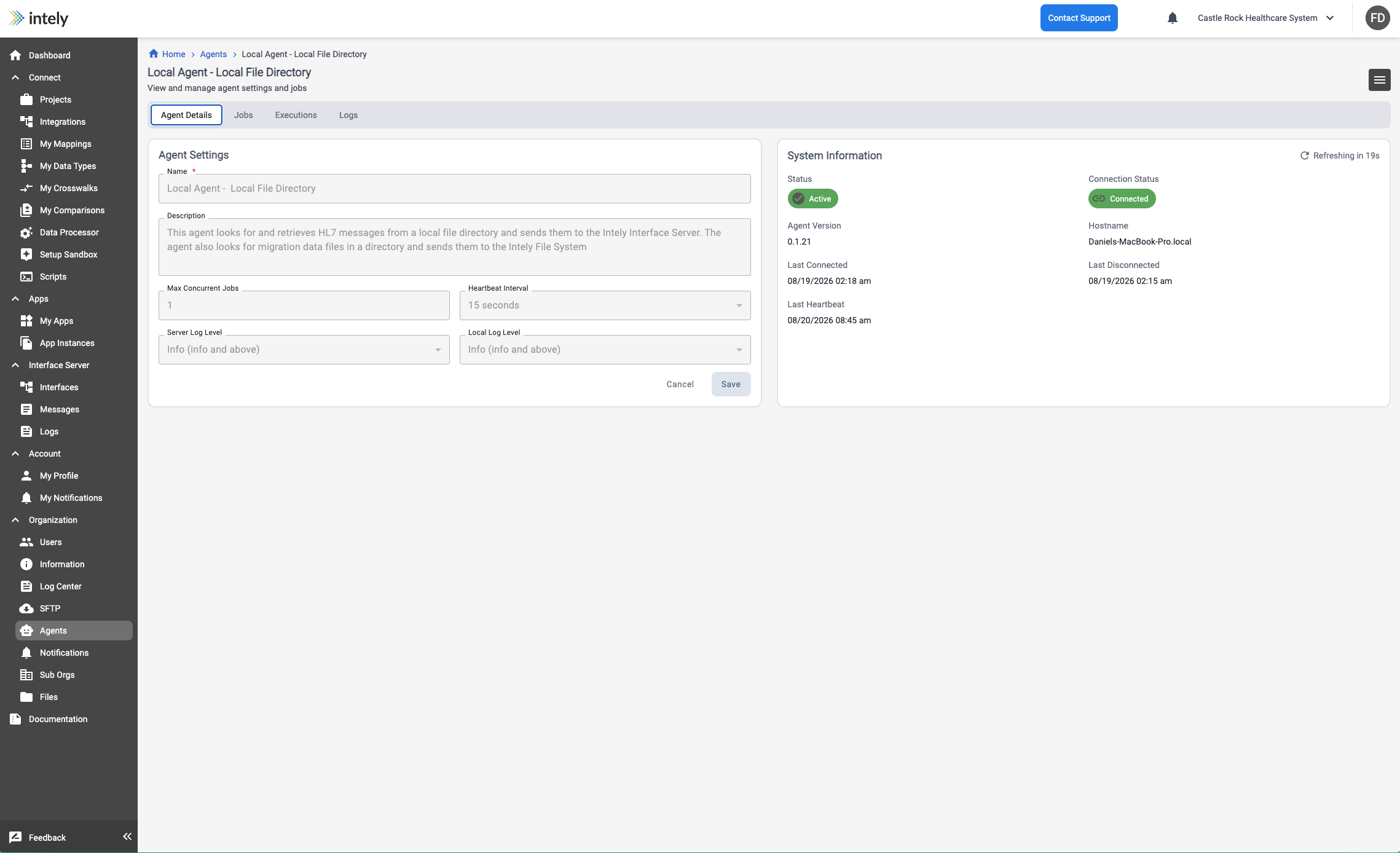
Once running, the agent connects out to Intely and begins sending a heartbeat. Its detail page
shows a System Information panel with the Hostname it is running on, the Agent
Version, and the times it last connected, last disconnected and last sent a
heartbeat — the panel refreshes on its own, so it is a live view rather than a snapshot.
An agent's page is organized into four tabs: Agent Details for settings and system
information, Jobs for the jobs defined on it, Executions for their run history, and
Logs.
Agent status
Two statuses are tracked independently.
Lifecycle status — whether the agent is allowed to work:
| Status | Meaning |
|---|---|
| Pending | Created in Intely; has not yet connected |
| Enabling | Being brought into service |
| Active | Accepting and running jobs |
| Disabling | Draining — finishing in-flight jobs, accepting no new ones |
| Disabled | Not accepting jobs |
| Interrupted | Stopped unexpectedly |
Connection status — whether it's reachable right now: Connected, Disconnected,
or Reconnecting.
Disabling an agent drains it rather than killing it: in-flight jobs are allowed to finish
before it goes fully Disabled.
Agent settings
| Setting | Default | Notes |
|---|---|---|
| Max concurrent jobs | 1 | Raise if the host has capacity and jobs are I/O-bound |
| Heartbeat interval | 15 seconds | Lower detects outages sooner, at the cost of chatter |
| Server log level | info | Minimum level forwarded to Intely: debug, info, warn, error, disabled |
| Local log level | info | Minimum level written to the agent's own console |
Agent logs
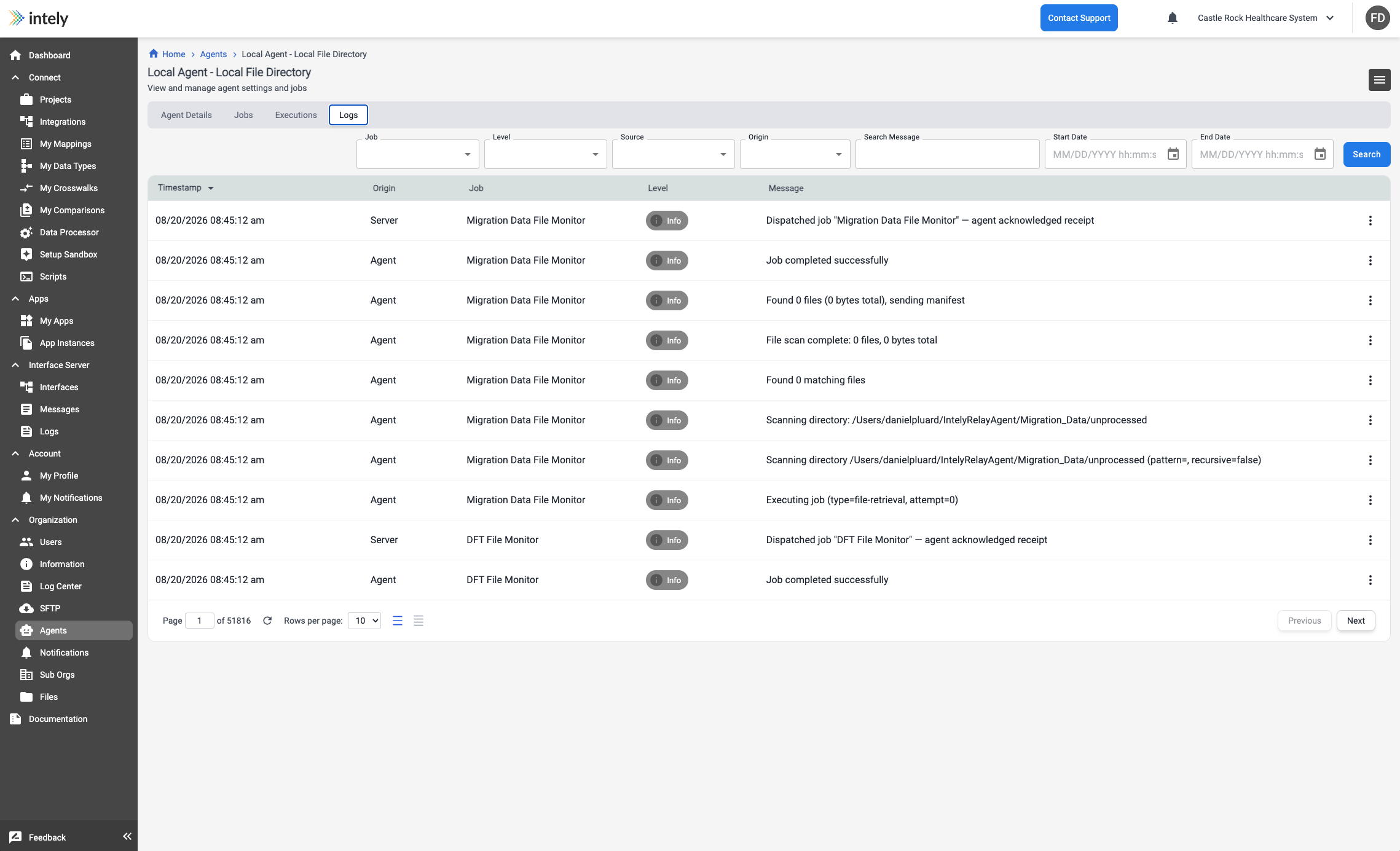
Each entry carries an Origin of either Server or Agent — the platform's side of the
exchange, or the agent's own. When a job appears to have been dispatched but nothing happened,
that column tells you which side to look at. Entries can be filtered by job, level, source,
origin, date range, or a search across the message text.
Organization → Agents → Logs shows everything the agent and the server have to say,
filterable by source:
| Source | Covers |
|---|---|
| Agent Lifecycle | Status transitions on the agent itself |
| Connection | Connect, disconnect and force-drain audit |
| Job Dispatch | Scheduling, dispatch, acknowledgement timeouts, agent selection |
| Execution | The agent's own step-by-step chatter while a job runs |
| Database Query | Database job detail |
| API Request | API job detail |
| File Retrieval | The whole file pipeline — retrieval, transfer, cleanup |
| Agent Update | Self-update rollout and apply |
Each line is also tagged with an origin: agent (emitted by the agent process) or
server (emitted by Intely).
Security notes
- The connection is outbound-only and TLS-encrypted.
- Intely stores only the token's identifier, not the token itself, so a token can be revoked
without Intely ever holding a usable credential. - Database and API credentials configured on a job are encrypted at the service layer.
- Database connections default to a secure SSL mode per driver (
requirefor Postgres,
preferredfor MySQL,truefor SQL Server). Disabling encryption is possible but not
recommended.
Updated 2 months ago