
Data Processor
Data Processor runs custom code inside Intely's infrastructure. When a transformation is
too complex for a mapping — heavy computation, a specialized library, a large-scale
aggregation — write it as a data processor job.
Find it under Connect → Data Processor.
Job types
| Type | Use for |
|---|---|
| Python 3.1.2 | General Python processing |
| Node 21 | Node.js processing |
| Node 22 Restricted | Node.js in a constrained sandbox |
| Node 22 Unrestricted | Node.js with fewer restrictions |
| Spark 3.5.3 | Distributed processing at scale — Python, Java, Scala or R |
Each type corresponds to a prepared execution environment. If you need a library that isn't
available in it, raise it with your Intely contact rather than assuming it is present.
How a job is put together
A job points at code and files that already live in the Intely File System.
- Source directory — an IFS directory containing your code. Its contents are copied into
the job'ssource/directory at run time. - Main file — the file within that directory to execute. For Java and Scala Spark jobs,
also supply a main class. - Input files — named slots your code reads from. Each input is bound at run time to
either a single IFS file or an IFS directory (all files directly inside it, flat —
subdirectories are not walked). Everything bound is copied into the job'sinput/
directory. You can give an input a reference file name so your code can hard-code the
name it expects. - Output files — named slots your code writes to. Each is defined by a match
expression (a regular expression) applied to the job'soutput/directory. Anything
matching is collected and written back into IFS. - Arguments — command-line arguments passed to your program. Each is either a value
(--name value) or a switch (--flag), in long (--) or short (-) form.
Mark inputs and outputs required where the job can't succeed without them.
The execution directory
At run time your job gets an isolated working directory:
source/    your code, copied from the source directory
input/     the files bound to your input slots
output/    write your results here
Write everything you want kept to output/. Files matching an output definition are copied
into IFS under system/temp/job-execution-<executionId>/; anything else is discarded when
the container exits.
Running a job
Provide values for any inputs and arguments, then run. Test Job runs the draft you are
working on without publishing it, which is the safer way to check a change.
Compute resources are allocated by the platform — there is nothing to size or select. If a job
is consistently running out of resources, raise it with your Intely contact rather than looking
for a setting.
Execution statuses
Pending → Waiting → Executing → Success or Failed.
A run can also end as User Terminated (you stopped it), System Terminated (Intely
stopped it) or Not Executed. Terminating is the transitional state after a stop is
requested.
Logs and outputs
Each execution keeps its full log, written into IFS alongside the outputs at
system/temp/job-execution-<executionId>/log-<executionId>.log. Open an execution to see
its log, its arguments, and links to every output file it produced.
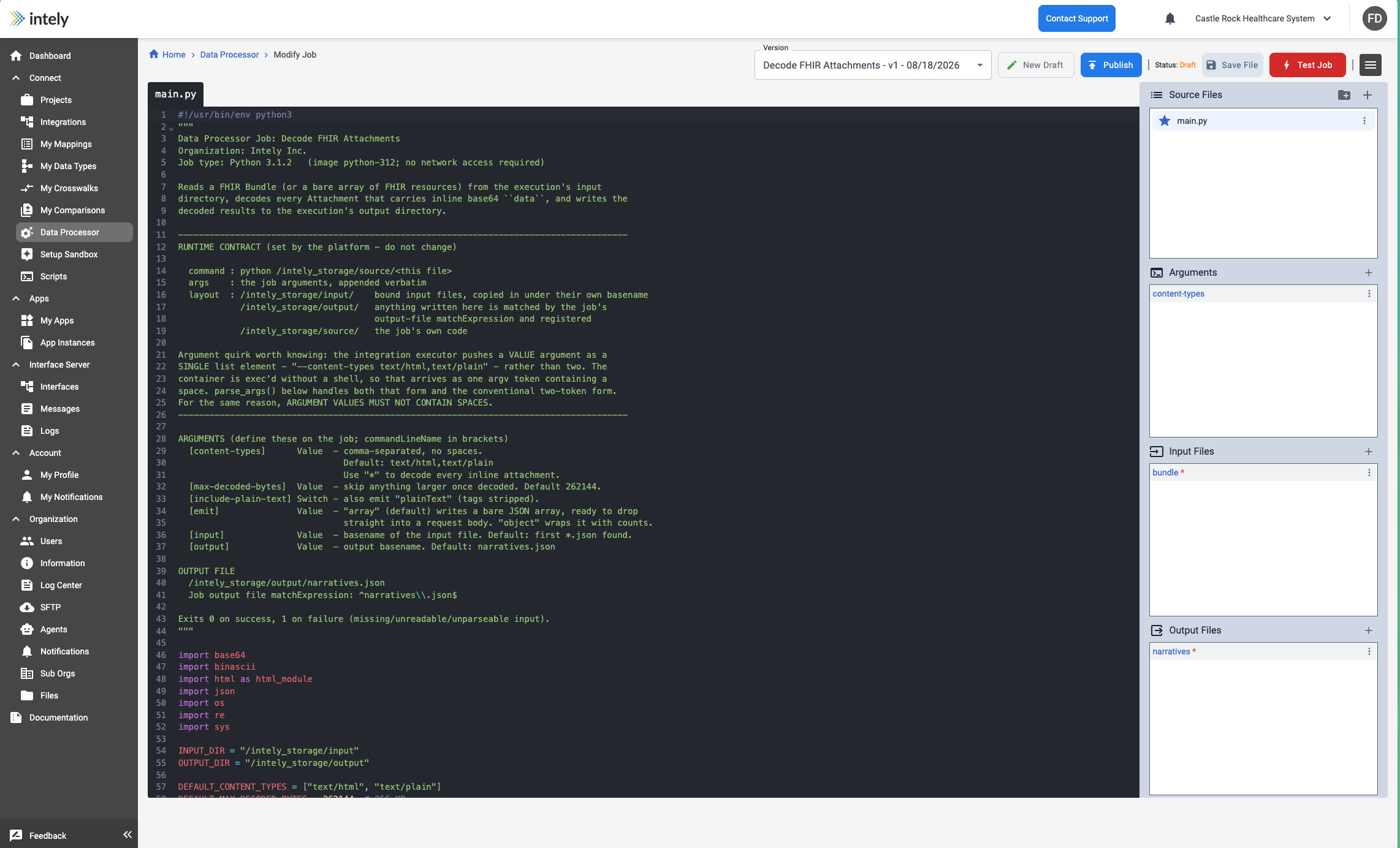
Versions, drafts and publishing
A job is versioned, and the version you are looking at is shown in a selector at the top of
the job. Alongside it:
| Control | What it does |
|---|---|
| New Draft | Starts a new draft from the current version |
| Save File | Saves your changes to the draft you are editing |
| Publish | Makes the draft the live version |
| Test Job | Runs it without publishing, so you can check a change first |
The job header shows a Status — Draft while you are working, until you publish. Because
each execution records the version that ran, a run's history stays meaningful after the job is
edited.
The practical sequence is: New Draft → edit → Save File → Test Job → Publish. Testing before
publishing is the point of the draft state.
Using a job inside an integration
The Integration Builder has a Data Processor step, so a job can run as part of a larger
workflow — for example, pull a file from a vendor, process it with Spark, then post the
results onward. See Data Processor (step).
Updated 2 months ago